
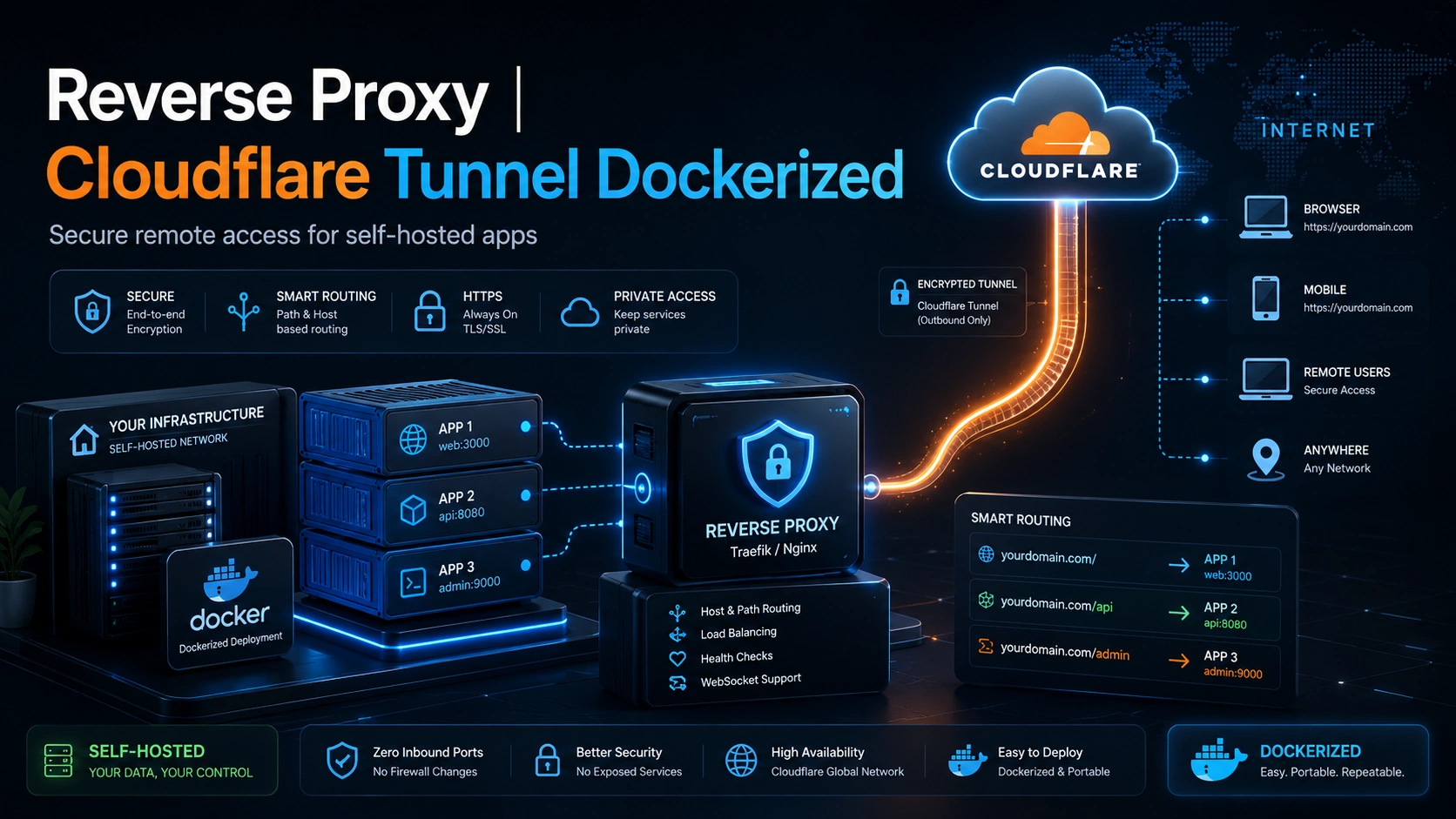
Reverse Proxy | Cloudflare Tunnel Dockerized – 515031
Original price was: ₨ 6,000.0.₨ 4,500.0Current price is: ₨ 4,500.0.
Securely expose your self-hosted apps using a Dockerized Reverse Proxy and Cloudflare Tunnel. No port forwarding, no public IP exposure, automatic HTTPS, and clean domain routing for your Docker apps, dashboards, APIs, and private services.
Secure, Docker-based reverse proxy and Cloudflare Tunnel setup for self-hosted applications, servers, dashboards, APIs, and internal tools.
This solution allows your applications to be accessed through a custom domain with HTTPS, without exposing your server’s public IP address or opening inbound firewall ports. It is ideal for home labs, small businesses, private dashboards, admin panels, Docker apps, NAS services, n8n, WordPress, ERP systems, APIs, and other self-hosted platforms.
The setup uses a reverse proxy such as Traefik or Nginx together with Cloudflare Tunnel, fully containerized using Docker Compose. Each application can be routed through clean domain or subdomain URLs, such as:
- app.yourdomain.com
- api.yourdomain.com
- admin.yourdomain.com
- What is included
We configure a complete Dockerized reverse proxy environment with Cloudflare Tunnel, HTTPS routing, domain/subdomain mapping, and secure access to your services.
Included setup:
- Cloudflare Tunnel configuration
- Docker Compose deployment
- Reverse proxy setup
- Subdomain routing
- HTTPS access
- App-to-domain mapping
- Basic security hardening
- Service documentation
- Restart-safe container setup
Key Benefits
Your apps can be accessed securely from anywhere without port forwarding. Cloudflare handles the public entry point, while your server keeps all inbound ports closed. This improves security, hides your origin IP, and makes deployment cleaner and easier to manage.
- No public IP exposure
- No router port forwarding required
- Free HTTPS via Cloudflare
- Multiple apps on one server
- Clean custom domains
- Dockerized and portable setup
- Easy backup and migration
- Better security for self-hosted apps
Best For
This service is suitable for customers running:
- n8n
- WordPress
- ERP / CRM systems
- Admin dashboards
- Internal business apps
- APIs
- Home lab services
- NAS web panels
- Docker apps
- Raspberry Pi / NUC servers
- Self-hosted tools
Requirements from Customer
Before setup, the customer should have:
- A domain name
- Cloudflare account
- Server, VPS, NUC, Raspberry Pi, or local machine
- Docker installed or permission for us to install it
- List of apps/services they want to expose
- Remote access to server
Related products



Reviews
There are no reviews yet